Set a different price per channel
A base price on the product, a channel-specific price wherever you want one, and a scheduled discount per listing: set the discount price, its start, and its end, and it applies and ends on time.
 Salla100100 SARbase
 Amazon10095100 SARbase
 Noon1009279100 SARbase
- Scheduled discount covers what is under it between two dates, then ends on its own
- Channel price covers the base on the channel you set it for
- Base price on the product, for every channel you have not priced
And a price sync status shows on each listing, so you know what succeeded and what needs a look.
Bulk editing
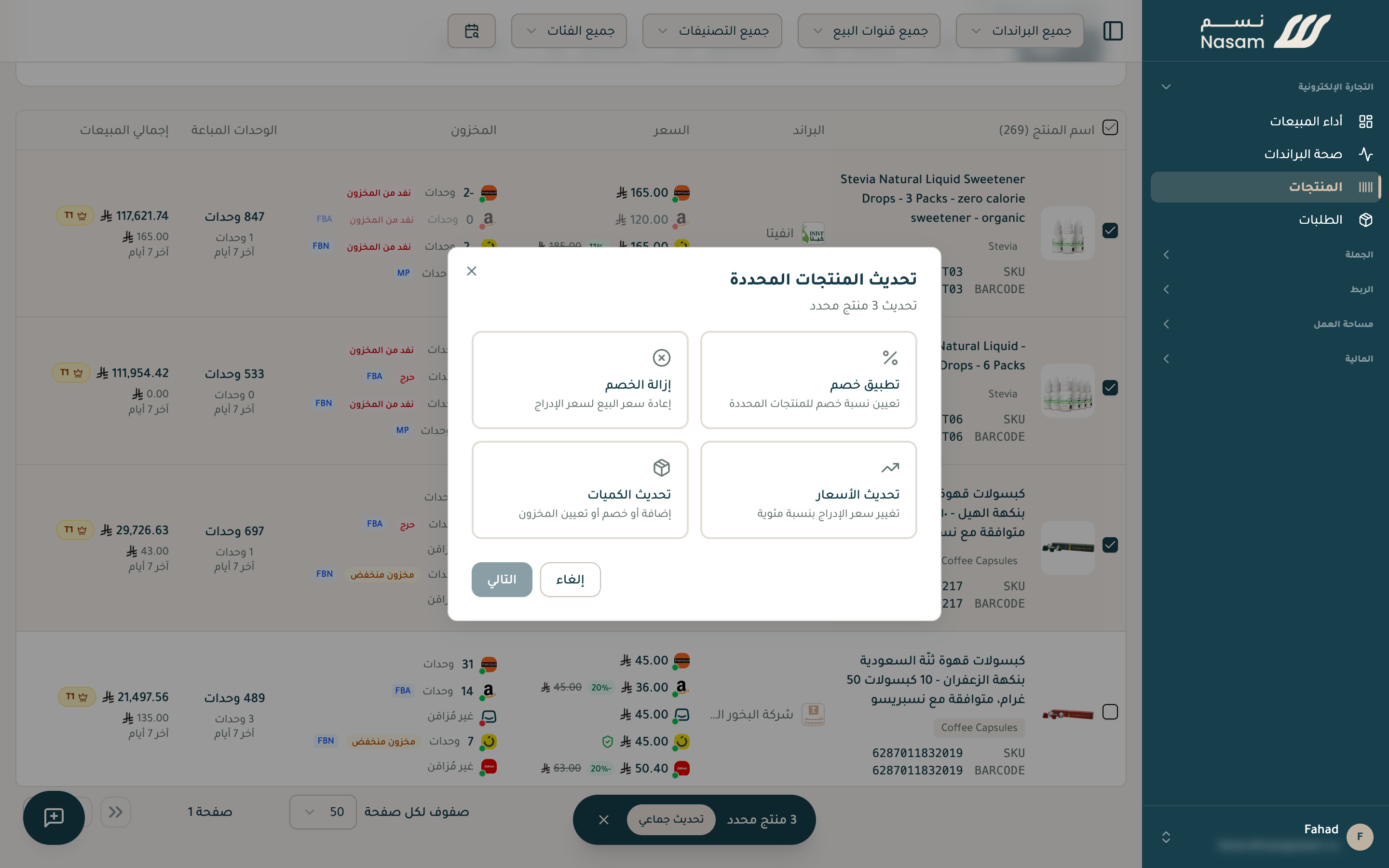
Select your products and open «Bulk update», and its options appear: apply a discount, update prices, remove a discount, and update quantities. For the whole catalog, upload a CSV file.
Your next step
- Orders and reports: where you see your prices' effect on sales.
Need a hand?
The Nasam team is with you, whatever the question: WhatsApp +966 55 009 0039 or general@nasam.co. And we set up your marketplace accounts with you, step by step. The consultation is free.